Gather Information
⚠️ Note: This feature is only available in Agent Mode.
Gather Information is a feature that allows you to configure how the chatbot collects user information during conversations. This is a critical step to ensure the system has the necessary data to process requests and accurately identify users.
This feature is particularly useful for:
- Lead qualification
- Service personalization
- Any scenario requiring structured user input
1. Enable/Disable Gather Information
- Enable: When enabled, the chatbot will actively collect predefined information by asking questions or extracting details from the user's input during the conversation.
- Disable: When disabled, the chatbot will skip the information collection process entirely.
Once enabled, the chatbot uses your configuration to determine what information to collect and how to collect it.
- If a field is marked as required, the chatbot will proactively ask the user for that specific information during the conversation.
- If a field is not required, the chatbot will attempt to extract it automatically from the user's input (if mentioned), but won’t prompt the user for it.
This flexible behavior helps maintain a balance between user convenience and data completeness.
2. Core Configuration
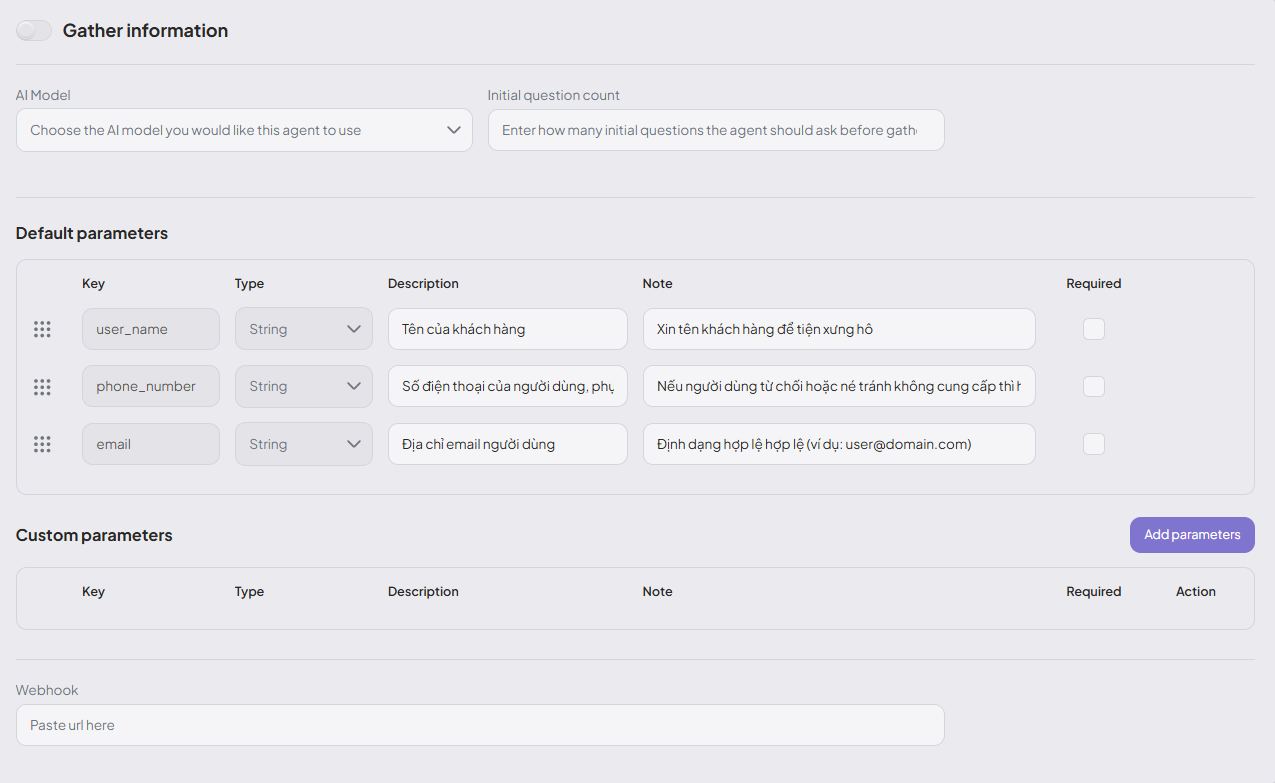
2.1. AI Model
-
Purpose: Select the appropriate AI model to handle the information-gathering phase.
-
How to use: Choose from the list of available models (if your system supports multiple options).
3. Default Parameters
These are standard data fields commonly used by the system.
| Field | Description | Purpose | Notes |
|---|---|---|---|
user_name | User’s full name | Personalizes the conversation | Helps the chatbot address the user by name and log identity info |
phone_number | User’s phone number | For follow-up contact or verification | May include an explanation if the user declines to provide it |
email | Email address | For sending results, notifications, or verification | Must be a valid format (e.g., user@domain.com) |
4. Custom Parameters
You can define custom fields based on your business requirements. Click "Add Parameters" to create new fields with the following attributes:
- Key: Internal identifier (e.g.,
age,hobbies) - Type: Data type (e.g.,
String,Number,Boolean) - Description: Field description for admin reference
- Note: Instruction for the chatbot on how to ask for this field
- Required: Mark as mandatory if this information must be collected
5. Webhook (Data Integration)
-
Webhook URL: Enables integration with external systems (e.g., CRM, internal APIs) by sending the gathered data once the process is complete.
-
How to use: Paste the valid URL of your backend system. The chatbot will automatically send the collected data to this endpoint after gathering.